FREE Shipping $50+
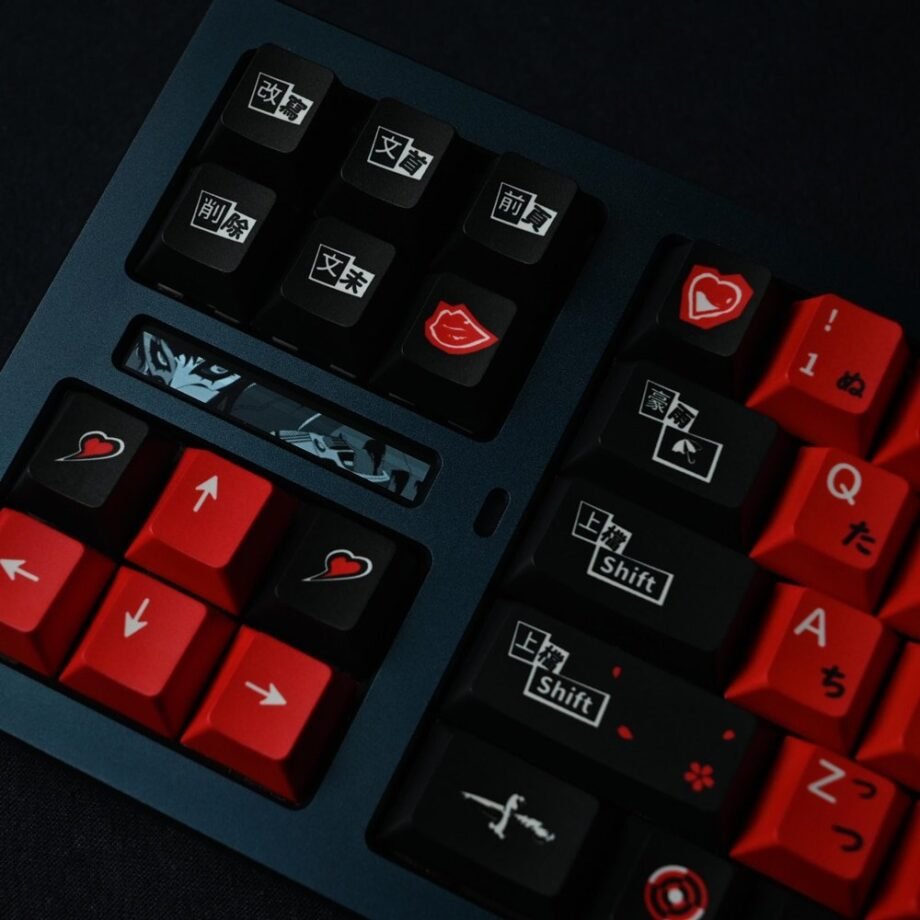
Looking for a Persona 5 keyboard to match Joker’s rebellious style? Here’s what most fans discover: you’re not actually looking for a complete keyboard – you need Persona 5 keycaps. This confusion costs fans hundreds of dollars and months of frustration, but understanding the difference takes just a few minutes.
If you’re searching for “Persona 5 keyboard,” you’re probably imagining those iconic red and black colours that capture the Phantom Thieves’ aesthetic. The good news? You can achieve that exact look without buying an entirely new keyboard. The secret is swapping your existing keys for Persona 5-themed keycaps – and the result is far more customisable (and affordable) than you’d expect.
Quick Answer: Keyboard vs Keycaps Explained
Keyboard: The entire device, including the board, switches, electronics, and keys. Cost: $150-$400+
Keycaps: Just the removable plastic caps that sit on top of your keyboard’s switches. Cost: $60-$80
What you actually want: Persona 5 keycaps to transform your existing mechanical keyboard into a Phantom Thieves setup.
Think of it like customising a car. You don’t buy an entirely new vehicle just to change the steering wheel and seats – you upgrade the parts. Same principle with keyboards. Your mechanical keyboard’s “engine” (the switches and board) stays the same. You’re just giving it a Persona 5 makeover with new keycaps.
Understanding the Persona 5 Keyboard Search
When you search “Persona 5 keyboard,” you’re joining 7,000+ monthly searches from fans who want that signature red and black aesthetic. Here’s why this search is confusing:
What People Are Really Looking For:
- Persona 5’s iconic colour scheme (red, black, white accents)
- Joker/Phantom Thieves visual theme
- Gaming-appropriate aesthetics
- That rebellious, stylish vibe from the game
What Actually Exists:
- No official Persona 5 branded complete keyboard
- Custom keycap sets featuring P5 colours and themes
- DIY keyboard builds with Persona 5 aesthetics
- Keycap sets inspired by the game’s visual style
The confusion happens because “keyboard” and “keycaps” sound similar, and if you’re new to mechanical keyboards, you might not know the difference yet. That’s completely fine – most fans start exactly where you are.
Why Keycaps Are the Better Choice
Buying Persona 5 keycaps instead of a pre-built “themed keyboard” gives you several massive advantages:
1. You Already Own the Foundation
If you have any mechanical keyboard (even a basic gaming board), you can transform it with keycaps. No need to replace your entire keyboard just for aesthetics.
Compatible keyboards include:
- Cherry MX switches (most common)
- Gateron switches
- Kailh switches
- Most mainstream gaming keyboards from Razer, Corsair, Logitech (check switch type)
2. Better Quality, Lower Cost
A Persona 5 keycap set runs $60-$80. A completely new mechanical keyboard? $150-$400+.
You’re essentially paying for aesthetics, not rebuilding your entire typing experience. The keycaps are what you see and touch – your keyboard’s internal mechanics stay exactly the same.
3. Future-Proof Customisation
Love Persona 5 today, but want a different theme in six months? Swap keycaps again. Your keyboard becomes a canvas for whatever aesthetic you’re into, whether that’s Evangelion next, Japanese minimalism after that, or back to Persona 5 when you replay Royal.
Multiple fans in the mechanical keyboard community own several keycap sets and rotate them seasonally. It’s like changing phone cases, but for your keyboard.
4. Authentic Phantom Thieves Aesthetic
Pre-built “gaming keyboards” rarely nail the specific aesthetic you’re imagining. They might have red backlighting, but that’s not the same as Persona 5’s precise colour palette and style.
Quality Persona 5 keycaps capture:
- Exact colour matching: That specific red-and-black combo from the game’s UI
- Japanese design elements: Katakana legends, clean typography
- Cherry profile sculpting: Comfortable typing that matches your gaming sessions
- PBT durability: Won’t develop that greasy shine after months of use
The Persona 5 Game Keycaps Set: What You’re Actually Getting
Our Persona 5 Game Keycaps Set delivers exactly what Phantom Thieves fans want: that rebellious red-and-black aesthetic with Japanese-inspired design elements.
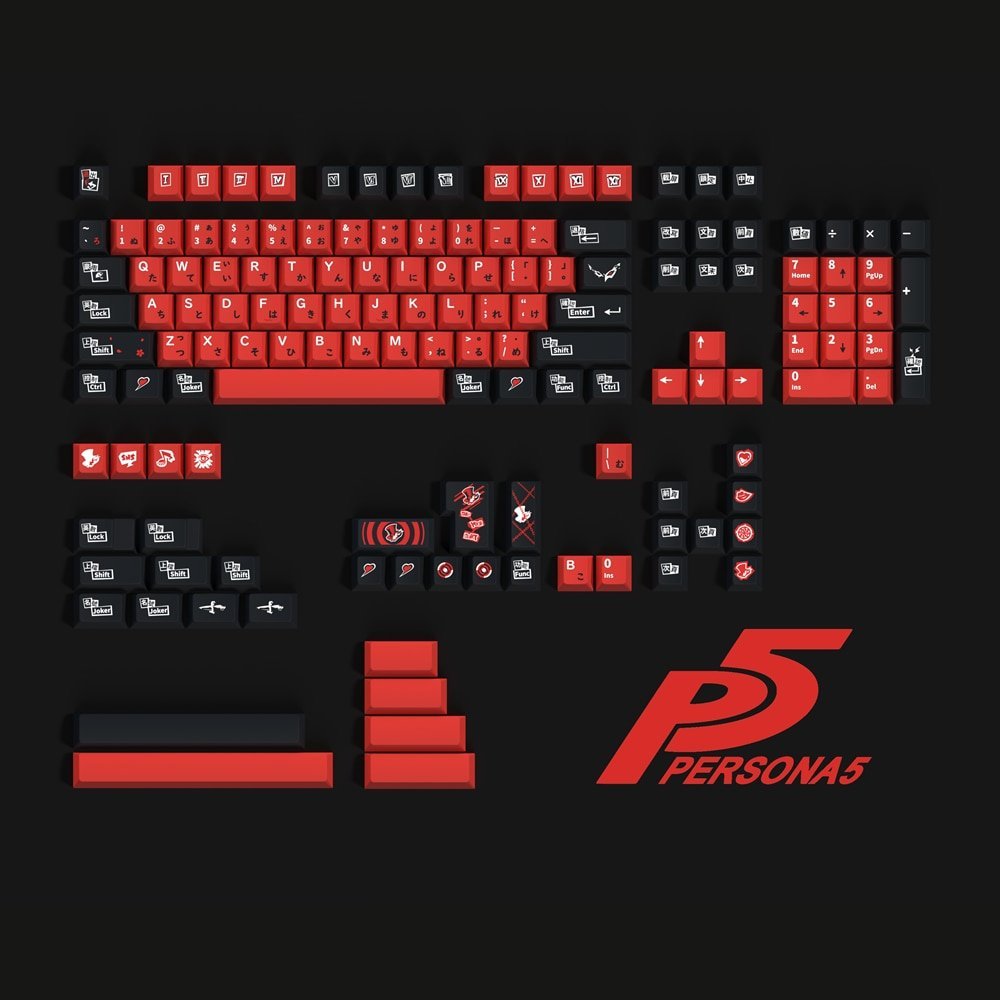
Colour Scheme:
- Bold red accents (reminiscent of the Persona 5 UI)
- Deep black base (matches the game’s stylish darkness)
- Clean white legends for contrast
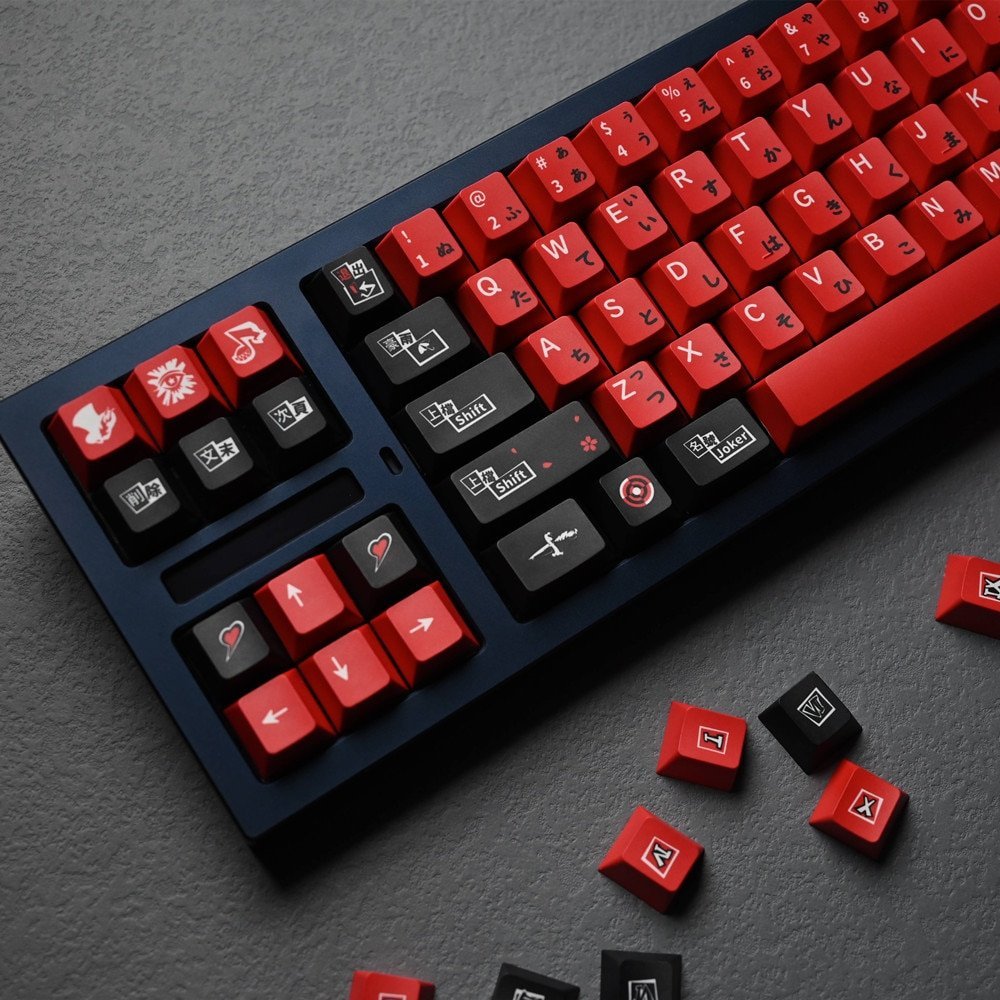
Design Details:
- Japanese katakana sub-legends on select keys
- Cherry profile for comfortable typing and gaming
- PBT material (more durable than cheap ABS plastic)
- Full 104-key coverage for standard layouts
Why This Works for P5 Fans:
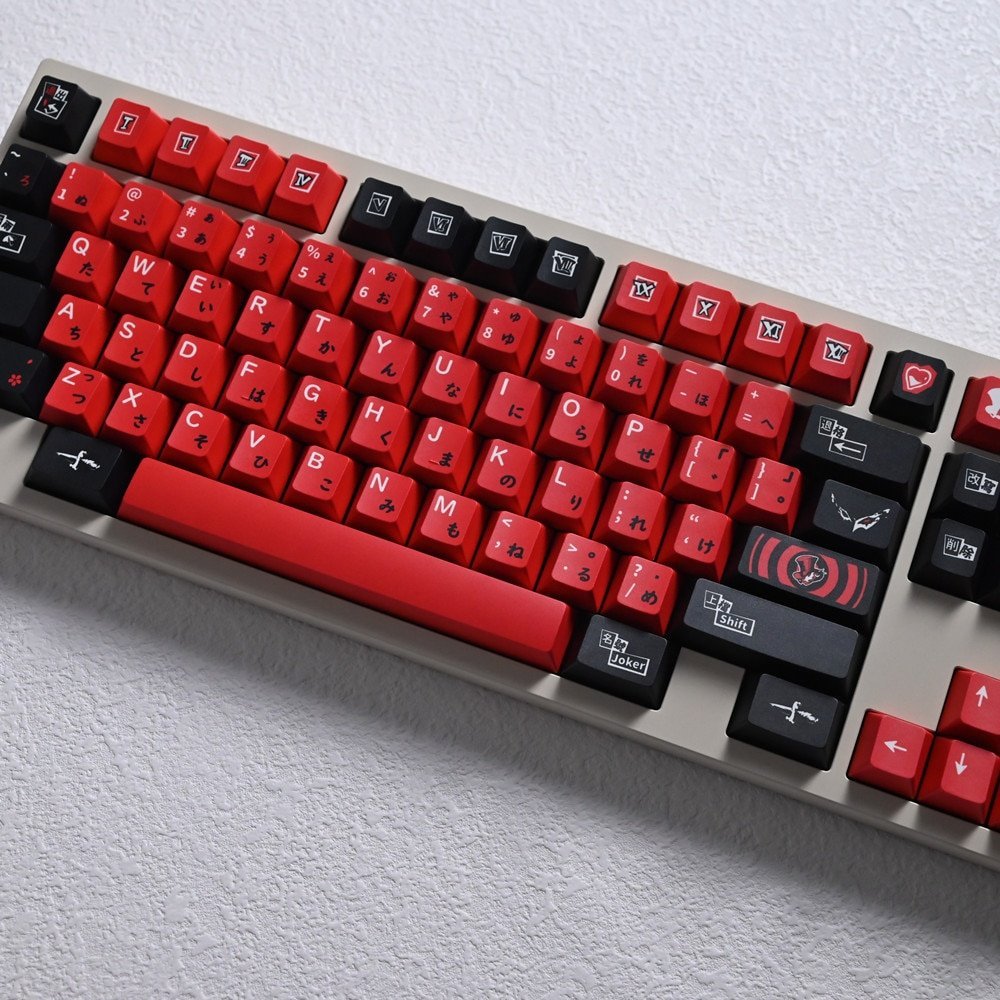
The colour combination captures Persona 5’s visual identity without being obnoxiously branded. It’s subtle enough for work or streaming but unmistakable to anyone who knows the game. You get that “in the know” vibe – the keyboard equivalent of wearing a Phantom Thieves calling card.
The Japanese legends add authenticity. Persona 5 is deeply rooted in Tokyo culture, and having katakana on your keycaps reinforces that aesthetic. It’s a detail that makes the difference between “generic red keyboard” and “clearly inspired by Persona 5.”
Building Your Complete Persona 5 Setup
Keycaps are the star, but a complete Phantom Thieves desk setup considers the full aesthetic:
Your Base Keyboard
Already own a mechanical keyboard? Check if it has Cherry MX-compatible switches (most do). If yes, you’re ready to install Persona 5 keycaps immediately.
Don’t own a mechanical keyboard yet? Start with a solid foundation:
- 60% layout: Compact, space-saving (good for gaming)
- TKL (Tenkeyless): No numpad, clean aesthetic
- Full-size: Traditional layout if you need a numpad
Choose based on your needs, not brand marketing. Your keycaps will define the look; the keyboard just needs reliable switches.
Matching Your Setup
RGB Backlighting Consideration:
Persona 5 keycaps look fantastic with or without RGB, but here’s the strategic approach:
- Red backlighting: Perfect for the P5 aesthetic (set to solid red)
- RGB capable: Use red for Persona 5 mode, swap colours for other games
- No backlighting: Still looks excellent – the keycaps carry the aesthetic
The Persona 5 Game Keycaps Set is designed with solid colouring, not shine-through legends. This means backlighting won’t illuminate the letters, but you get that premium opaque look that matches the game’s bold visual style.
Desk Accessories:
- Red and black mousepad
- Phantom Thieves artwork/posters
- Minimalist black desk lamp
- Red accent lighting (LED strips)
Keep it clean and intentional. Persona 5’s aesthetic is stylish, not cluttered.
Installation: Easier Than You Think
Never installed keycaps before? It takes about 15 minutes and requires just one tool.
What You Need:
- Keycap puller (usually included with keycap sets, or $5-10 separately)
- Your new Persona 5 keycaps
- 15 minutes of patience
Process:
- Pull off old keycaps using the keycap puller (straight up, gentle pressure)
- Place new Persona 5 keycaps on the switches (press down until you hear/feel a click)
- Repeat for all 104 keys
- Admire your Phantom Thieves setup
Pro tip: Take a photo of your original keycap layout before removing them. This helps if you forget where specific keys go (though most sets include a layout guide).
There’s no electronics involved, no soldering, no technical expertise required. If you can assemble IKEA furniture, you can install keycaps. Mechanical keyboard switches are designed for keycap swapping – it’s literally built into how they work.
Keycaps vs Complete Keyboard: Cost Comparison
Let’s break down what you’d actually pay for each approach:
Option 1: Buy Persona 5 Keycaps (Smart Choice)
- Persona 5 keycap set: $60-$80
- Existing mechanical keyboard: $0 (you already own it)
- Installation: $0 (DIY in 15 minutes)
- Total: $60-$80
Result: Professional Persona 5 aesthetic, keeps your familiar typing experience, easily changeable.
Option 2: Buy Entirely New Keyboard (Expensive, Limited)
- “Gaming” keyboard with red backlighting: $150-$400
- Custom keycaps to actually look like P5: $60-$80 more
- Learning curve for new switches: Time investment
- Total: $210-$480
Result: You paid premium for a new keyboard you didn’t need, still bought keycaps anyway to get the actual P5 look.
Option 3: Commission Custom Keyboard Build (Enthusiast Route)
- Custom mechanical keyboard kit: $200-$500
- Switches: $40-$80
- Custom Persona 5 keycaps: $60-$150
- Assembly/build time: 2-4 hours
- Total: $300-$730
Result: Absolute dream keyboard, but only worth it if you’re committed to mechanical keyboard hobby beyond just aesthetics.
For 95% of Persona 5 fans: Option 1 is the move. You get the aesthetic you want without the complexity or expense.
Common Questions About Persona 5 Keycaps
“Will these fit my keyboard?”
If your keyboard has Cherry MX-compatible switches (which includes most mechanical keyboards), yes. This covers:
- Cherry MX Red, Blue, Brown, Black
- Gateron switches (all variants)
- Kailh switches
- Most gaming keyboards from major brands
To check: Can you pull off your current keycaps? If yes, these will fit.
Won’t fit: Laptop keyboards, membrane keyboards, keyboards with non-standard stems.
“Do I need a full set or just some keys?”
Full sets are recommended because:
- Consistent aesthetic across your entire keyboard
- All keys match in colour and profile
- No visual mismatch between new and old keycaps
Some fans buy accent keycap sets (just a few special keys), but for the complete Persona 5 look, a full set delivers the transformation you’re imagining.
“How long do keycaps last?”
PBT keycaps (like quality Persona 5 sets) last years with daily use:
- Legend durability: Dye-sublimated legends won’t fade or wear off
- Material quality: PBT resists the greasy shine that develops on cheaper ABS
- Physical durability: Keycaps can outlast your actual keyboard
You’ll likely change them for aesthetic reasons (wanting a new theme) long before they wear out from use.
“Can I use these for gaming and typing?”
Absolutely. Keycaps are purely aesthetic – they don’t change your switches’ performance. Your typing and gaming experience depends on your keyboard’s switches, not the keycap colour.
Gaming consideration: The Cherry profile is comfortable for both gaming and productivity. Your muscle memory stays the same; you’re just looking at red and black instead of whatever colour your old keycaps were.
“What if I want to go back to my original keycaps?”
Keep your original keycaps in a box. Swapping back takes the same 15 minutes as installation. Many fans maintain multiple keycap sets and rotate them based on mood, season, or current gaming obsession.
Beyond Persona 5: Other Anime Keyboard Aesthetics
Love Persona 5’s visual style but curious about other anime-inspired keycaps? The mechanical keyboard hobby has massive overlap with anime fandom.
If you like P5’s bold colours and Japanese aesthetic, consider:
Evangelion Keycaps – Similar rebellious energy with Unit-01’s purple, Unit-02’s red, or Unit-00’s blue schemes. EVA’s colour accuracy obsession mirrors P5 fans’ attention to detail.
Japanese Keycaps Collection – Minimalist black-and-white sets with Japanese legends. Professional appearance with subtle cultural nods – perfect if you need a “work mode” keyboard that still reflects your interests.
Demon Slayer Keycaps – Bold character-inspired colour schemes (Tanjiro’s green, Nezuko’s pink, Zenitsu’s yellow). Similar character-driven aesthetics to P5’s Phantom Thieves members.
Pokemon Keycaps – Playful colours for specific Pokemon (Pikachu yellow, Bulbasaur green, Squirtle blue). If you love P5’s character-specific aesthetics, Pokemon keycaps offer similar personality-based customisation.
The anime mechanical keyboard community constantly launches new sets. Following Keysium means you’ll catch new releases matching your current obsessions – whether that’s seasonal anime, classic franchises, or upcoming game releases.
Making the Right Choice for Your Setup
You should buy Persona 5 keycaps if:
- You already own a mechanical keyboard
- You want the P5 aesthetic without rebuilding your entire setup
- You value customisation and the ability to change themes later
- You’re looking for quality at a reasonable price point
- You appreciate Japanese-inspired design details
You might need a new keyboard first if:
- You’re currently using a laptop or membrane keyboard
- Your existing keyboard is broken or unpleasant to type on
- You want to upgrade switches for better typing/gaming feel
- You’re ready to invest in mechanical keyboard hobby
Be honest about your priorities. If you purely want the Persona 5 aesthetic and your current keyboard works fine, keycaps are the play. If you’ve been wanting to upgrade your typing experience anyway and Persona 5 is the excuse you need, combine both (new keyboard + P5 keycaps).
Where Keysium Fits In
We specialise in anime-themed keycaps that capture what fans actually want: accurate colours, quality materials, and designs that reflect beloved franchises. No generic “gaming aesthetic” – specific colour palettes and design elements that make fans immediately recognise the reference.
What makes our Persona 5 set work:
- Colour accuracy matching the game’s visual identity
- PBT material that outlasts cheaper alternatives
- Cherry profile for comfortable daily use
- Japanese legends that add authenticity
- Affordable pricing compared to custom group buys
You’re not compromising between “cheap but inaccurate” and “perfect but impossibly expensive.” Quality Persona 5 keycaps exist in that sweet spot where fans get exactly what they’re imagining without breaking the bank.
Curious about other franchises? Check out our complete anime keycaps collection or dive into specific favourites. We’ve helped 1,500+ anime and gaming fans transform their keyboards into personal statements about their passions.
Your Next Steps
Ready to build your Phantom Thieves keyboard?
- Check your current keyboard: Does it have mechanical switches? (If you can pull the keys off and see a switch underneath, yes)
- Grab the Persona 5 Game Keycaps Set: PBT quality, red and black design, Japanese legends
- Install in 15 minutes: Use a keycap puller, swap your keys, admire the transformation
- Enjoy your setup: Game, work, stream – whatever your keyboard life involves
If you’re still deciding between keycaps and a full keyboard, remember: keycaps give you the aesthetic at a fraction of the cost, and you can always upgrade your base keyboard later. Start with what you need (the look), add what you want (better switches) when you’re ready.
The Phantom Thieves didn’t compromise on style, and neither should your setup. Your keyboard is the tool you interact with most during gaming, work, and everything in between. Make it something you’re genuinely excited to sit down in front of every day.
Frequently Asked Questions
What’s the difference between a keyboard and keycaps?
A keyboard is the complete device including the electronics, switches, and keycaps. Keycaps are just the removable plastic caps that sit on top of the switches. You can swap keycaps without changing your keyboard’s functionality – it’s a purely aesthetic upgrade.
Are Persona 5 keycaps officially licensed?
Our Persona 5 keycaps are inspired by the game’s colour scheme and aesthetic rather than officially licensed merchandise. They capture the red and black visual identity that P5 fans recognise without using trademarked logos or imagery.
How do I know if keycaps will fit my keyboard?
Check if your keyboard has Cherry MX-compatible switches (most mechanical keyboards do). If your keycaps can be pulled off and you see a small stem underneath, standard keycap sets will fit. Laptop keyboards and membrane keyboards won’t work with custom keycaps.
Can I return keycaps if they don’t fit?
Keysium offers returns and exchanges if the keycaps don’t fit your specific keyboard layout. Check our return policy for details, but we’re committed to ensuring you get keycaps that actually work for your setup.
Do Persona 5 keycaps work with RGB backlighting?
Yes, but the keycaps have solid colouring (not shine-through legends). Your RGB backlighting will glow around the keycaps rather than through the letters. This creates a premium look but won’t illuminate the legends themselves. Setting your RGB to red enhances the Persona 5 aesthetic perfectly.
How long does shipping take?
Standard shipping typically takes 2-3 weeks for international orders. We provide tracking information so you can monitor your keycaps’ journey to your setup.
What if I mess up installation?
Keycap installation is very forgiving. If a keycap doesn’t sit flush, simply pull it off and try again. The worst case scenario is you put the wrong keycap on the wrong key – just pull it off and swap it to the correct position. Take your time, and you’ll be fine.
Can I mix Persona 5 keycaps with other sets?
Technically yes, but the visual mismatch usually looks worse than you’d expect. Different keycap sets have slightly different profiles, materials, and colour tones. For the cleanest aesthetic, use a complete matching set rather than mixing and matching.