FREE Shipping $50+
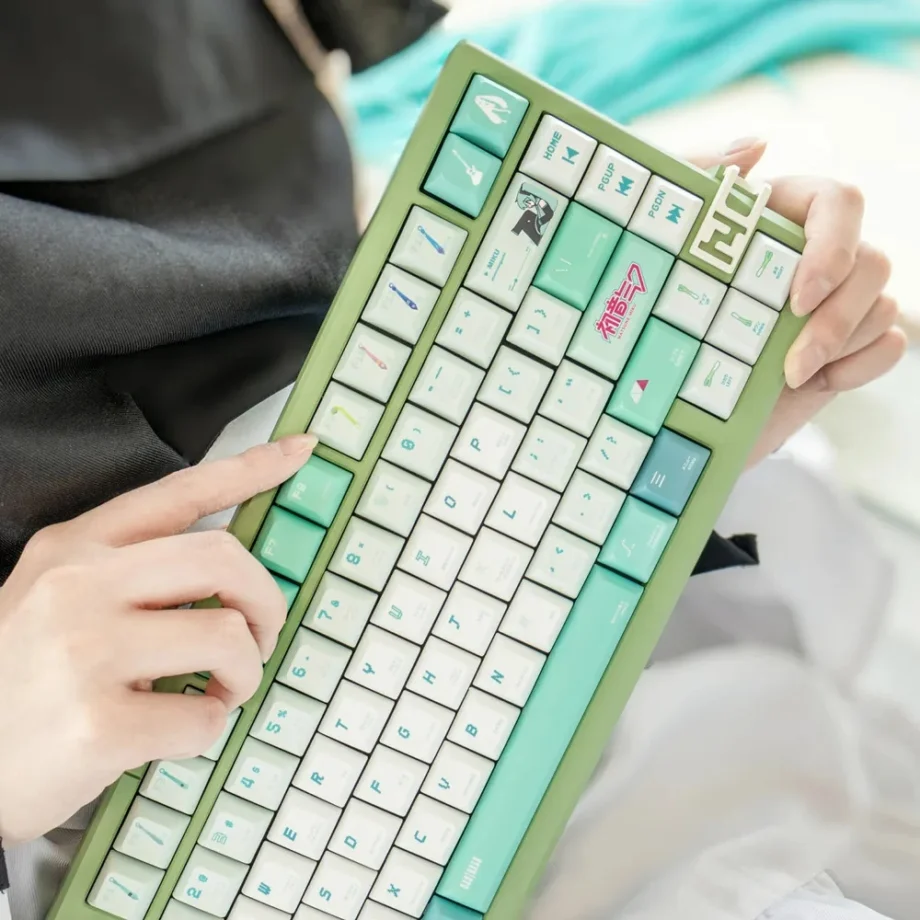
Looking for Hatsune Miku keycaps that capture the world’s most iconic virtual idol? You’ve found the complete guide to Miku keycaps available in 2026, covering everything from concert-ready teal aesthetics to kawaii Project DIVA designs and backlit RGB options. Whether you want that signature turquoise energy on your desk, cute Vocaloid vibes, or dramatic stage lighting effects, this guide breaks down exactly which Miku keycap sets match your priorities.
Hatsune Miku keycaps bring specific energy to your workspace: creative inspiration, that distinctive virtual idol aesthetic, and the constant reminder that innovation comes from unexpected places. The world’s first truly successful virtual performer on your keyboard isn’t just fandom display, it’s daily motivation to create something new.
This guide covers which Miku keycap styles exist, how to choose between teal themes and character-focused designs, what makes Vocaloid aesthetics unique for keyboards, and how concert energy translates to workspace builds.
Understanding Hatsune Miku Keycap Varieties
Hatsune Miku keycaps in 2026 offer surprising variety for a single character, reflecting Miku’s versatility as a virtual idol. You’re choosing between different aesthetic approaches: signature teal colour themes, kawaii character focus, concert stage energy, or dramatic backlit designs. Each captures different aspects of what makes Miku iconic.
Why Miku Keycaps Offer Multiple Styles
Unlike most anime characters who appear in one or two outfits, Miku exists across thousands of fan interpretations, concert designs, and official variations. This translates to keycap designs that emphasise different elements: sometimes the iconic teal and twin-tails, sometimes kawaii energy, sometimes that futuristic virtual idol aesthetic.
The variety means you’re not just choosing “Miku keycaps.” You’re choosing which version of Miku resonates with your workspace needs.
Teal Theme Sets: The Signature Miku Colour
Miku’s teal colour scheme is instantly recognisable even to people who’ve never heard of Vocaloid. These sets emphasise the turquoise, green, and aqua tones that define the virtual idol’s aesthetic.
Hatsune Miku Green & White KCA Set
The Hatsune Miku green and white KCA keycaps use clean colour blocking with Miku’s signature teal green and crisp white. This is Miku distilled to pure colour aesthetic, capturing her visual identity without relying heavily on character artwork.
Colour scheme: Teal green with white accents
Visual style: Clean colour blocking, minimalist Miku aesthetic
Energy: Fresh, creative, distinctly Miku without being character-heavy
Best for: People who want recognisable Miku colours without obvious character art, clean desk aesthetics, professional environments where teal reads as “interesting colour choice”
Why this works: The teal and white combination is unmistakably Miku to fans while reading as simply “nice colour scheme” to non-fans. Perfect if you want Miku energy that doesn’t announce itself loudly.
Cute Hatsune Miku Future Beat Blue/Aqua
The Cute Hatsune Miku Future Beat set features blue and aqua tones with Miku character elements. This bridges the gap between pure colour theming and character representation, giving you both Miku’s signature colours and her iconic appearance.
Colour scheme: Blue, aqua, turquoise spectrum
Visual style: Miku character elements with emphasis on colour
Energy: Cute, energetic, distinctly Vocaloid
Best for: Fans wanting both colour and character, people who love aqua aesthetics, setups where Miku’s turquoise creates the colour focal point
Why this works: Blue and aqua create that “future beat” energy that Vocaloid represents. This is Miku as technological innovation meets creative expression.
Kawaii Character Sets: Project DIVA Energy
Some Miku keycap sets emphasise the kawaii character aspect, capturing Miku’s cute and playful personality rather than just her colour scheme.

Kawaii Hatsune Miku Project DIVA Set
The Kawaii Hatsune Miku Project DIVA keycaps feature Miku in various cute poses and expressions across multiple keys. This is Project DIVA energy, the rhythm game series that made Miku accessible to wider audiences through gameplay rather than just music.
Colour scheme: Varied, focusing on Miku across different aesthetics
Visual style: Kawaii character artwork, playful and expressive
Energy: Fun, creative, rhythm game vibes
Best for: Project DIVA fans, people who love kawaii aesthetics, setups where personality matters more than minimalism, fans who appreciate Miku’s expressive range
Why this works: Project DIVA showed Miku’s versatility through hundreds of songs and outfits. These keycaps capture that variety, giving you different Miku expressions across your keyboard.
Backlit Sets: Concert Stage Lighting
Backlit Miku keycaps create that concert atmosphere, mimicking how Miku appears on stage with dramatic lighting during live performances.

Backlit Hatsune Miku Vocaloid Characters
The Backlit Hatsune Miku Vocaloid Characters set uses RGB-compatible designs that glow when backlit. This captures Miku as she appears during concerts, with lighting that creates atmosphere and drama.
Colour scheme: Dark base with RGB shine-through
Visual style: Concert-ready, dramatic lighting effects
Energy: Performance-focused, stage energy
Best for: RGB keyboard owners, concert enthusiasts, night work sessions where glow effects enhance atmosphere, people who want dramatic Vocaloid aesthetic
Why this works: Miku’s concerts are technological marvels with holographic displays and coordinated lighting. Backlit keycaps recreate that stage energy on your desk.
Backlit Hatsune Miku Cute Anime Girl Blue
The Backlit Hatsune Miku cute anime girl set emphasises Miku’s character with RGB compatibility. This balances cute character representation with the practical benefits of backlit designs for gaming and night use.
Colour scheme: Blue-focused with RGB shine-through
Visual style: Cute character art with lighting integration
Energy: Balanced kawaii and functionality
Best for: Gaming setups, RGB enthusiasts who also want kawaii aesthetic, people who use keyboards at night, fans wanting both cute and practical
Why this works: You get Miku’s cute personality plus practical RGB functionality. Not just aesthetic, genuinely useful for low-light use.
Vocaloid Aesthetics: What Makes Miku Different
Hatsune Miku isn’t just another anime character. She’s a Vocaloid, a virtual instrument that became a global phenomenon. This affects how Miku keycaps work aesthetically and motivationally.
The Virtual Idol Advantage
Traditional anime characters exist in fixed narratives. Miku exists as a creative platform. Thousands of producers create music using her voice, artists draw her in countless styles, and fans develop their own interpretations. This means Miku represents creative possibility rather than a single story.
When you have Miku keycaps on your keyboard, you’re not just displaying fandom for a character. You’re channelling that creative platform energy. Every time you type, you’re reminded that creation itself is the point, not consumption.
Why Teal Matters
Miku’s signature teal isn’t arbitrary, it’s carefully chosen to stand out in both digital and physical spaces. On stage, in artwork, across merchandise, that specific turquoise is recognisable globally. Having it on your keyboard creates instant visual impact while remaining sophisticated enough for professional environments.
The colour psychology works too: teal combines the calming properties of blue with the energising aspects of green. Perfect for creative work that requires both focus and energy.
Concert Energy for Productivity
Miku’s concerts demonstrate something unique: tens of thousands of people gathering to watch a holographic performer. The energy isn’t about the performer being “real,” it’s about the collective creative experience. That concert atmosphere, recreated through keycaps (especially backlit versions), channels focus and energy into your workspace.
How to Choose Your Hatsune Miku Keycaps
With multiple Miku styles available, your choice depends on specific priorities rather than just “I like Miku.”
Factor 1: Colour Theme vs Character Focus
Do you want Miku’s signature colours or her character representation?
Pure colour aesthetic: Green and white KCA set for clean teal theming
Balanced approach: Future Beat set with colours and character
Character-focused: Kawaii Project DIVA for maximum Miku expressions
Concert atmosphere: Backlit sets for stage energy
If you want Miku’s energy without obvious anime theming, colour-focused sets work perfectly. If you love Miku’s personality and expressions, character-focused sets deliver.
Factor 2: Professional vs Personal Environment
Where will your keyboard be visible?
Professional environments: Green and white KCA reads as sophisticated colour choice
Creative offices: Any Miku set works, creative fields accept personality
Personal workspace: Character-focused sets with full kawaii energy
Mixed visibility: Backlit sets that tone down when RGB is off
The teal colour theme is Miku’s genius for professional use: recognisable to fans, just “nice colours” to everyone else.
Factor 3: RGB and Lighting Needs
Do you have RGB backlighting and use it?
RGB keyboard, lights on: Backlit sets create concert atmosphere
RGB keyboard, sometimes off: Backlit sets work both lit and unlit
No RGB: All non-backlit options look excellent without lighting
Want dramatic effects: Backlit with teal/blue RGB mimics concert lighting
If you have RGB and use it, backlit Miku sets create effects that genuinely enhance workspace atmosphere, not just aesthetics.
Factor 4: Kawaii Level Preference
How much kawaii energy do you want?
High kawaii: Project DIVA set with multiple cute Miku expressions
Moderate kawaii: Future Beat set balancing cute with colours
Subtle kawaii: Backlit sets where character art is present but not dominant
Minimal kawaii: Green and white KCA for pure aesthetic
Miku exists across the entire kawaii spectrum. Choose your preference without compromise.
Building Your Vocaloid Keyboard Setup
Here’s the practical path from choosing Miku keycaps to having a complete virtual idol workspace.
Step 1: Choose Your Miku Style
Browse the complete Hatsune Miku keycaps collection and decide:
Want signature teal colours? Green and white KCA or Future Beat sets
Want kawaii character focus? Project DIVA set
Want concert lighting? Backlit options
Want maximum versatility? Future Beat bridges multiple priorities
Trust your immediate reaction. The Miku style that makes you smile is probably the right choice.
Step 2: Select Your Base Keyboard
You need a mechanical keyboard with Cherry MX-compatible switches:
Budget-friendly: Royal Kludge, Redragon (solid entry point)
Mid-range: Keychron, Ducky (excellent quality)
Premium: Custom builds if you want perfect Miku integration
RGB needed? Only for backlit sets, otherwise optional
Match your keyboard investment to actual usage. Miku’s appeal is creativity, not expensive equipment.
Step 3: Match Switches to Creative Energy
Choose switches based on the feel you want:
Creative flow: Linear switches (smooth, uninterrupted)
Rhythmic typing: Tactile switches (feedback like rhythm games)
Audio satisfaction: Clicky switches (satisfying but loud)
Balanced approach: Tactile Browns work for everything
Miku keycaps work with any switch type. The feel is independent of aesthetics.
Step 4: Install Your Virtual Idol Setup
Installation stays simple:
- Remove existing keycaps
- Press Miku keycaps onto switches
- Ensure full seating on each key
- Configure RGB if using backlit (teal/blue concert lighting)
15 minutes maximum, no technical expertise required.
Step 5: Complete Your Vocaloid Workspace
Miku keycaps anchor your setup. Complete the aesthetic:
Desk mat: Teal themes, music-related designs, minimalist matching green
Lighting: Teal LED strips for concert atmosphere
Monitor wallpaper: Concert scenes, Miku artwork, turquoise themes
Audio setup: Good speakers or headphones (you’re representing a Vocaloid)
Goal: workspace that channels Miku’s creative energy into your output.
Hatsune Miku Keycaps FAQ
Are Hatsune Miku keycaps officially licensed?
These Miku keycaps are inspired by the Vocaloid virtual idol but aren’t officially licensed by Crypton Future Media. The designs capture Miku’s aesthetic and character while remaining distinct products.
This is standard in mechanical keyboard community. It allows creative freedom, better pricing, and faster availability than official licensing typically permits.
Do Miku keycaps work with any mechanical keyboard?
Yes, all Hatsune Miku keycaps use Cherry MX-compatible stems (industry standard). Whether you choose teal colour themes, kawaii character sets, or backlit options, they fit the same mechanical keyboards.
Cherry, Gateron, Kailh, Outemu, and dozens of other switch brands use identical stem designs. You’re not locked into specific hardware.
Which Miku keycaps are best for gaming?
The backlit options (Backlit Vocaloid set or Backlit cute anime girl set) work excellently for gaming. Dark bases reduce distraction during competitive play while RGB creates atmosphere.
That said, keycaps don’t affect gaming performance. If you prefer the kawaii Project DIVA aesthetic or clean teal colours, use those for gaming without concern.
Can I use Miku keycaps in professional environments?
Absolutely, especially colour-focused options:
Conservative offices: Green and white KCA set reads as sophisticated colour choice
Creative offices: Any Miku set works perfectly
Remote work: Use whatever inspires you
Client-facing: Teal themes are professional while maintaining personality
Miku’s teal colour scheme is her secret weapon for professional use: distinctive without being obviously “anime.”
How long do Hatsune Miku keycaps last?
Quality PBT Miku keycaps with dye-sublimated printing last 5+ years of daily use. The teal colours and character artwork are part of the plastic itself, not coatings that wear off.
You’ll likely want different aesthetics before these wear out. Miku’s signature turquoise stays vibrant, character art remains crisp indefinitely.
Why are there so many Miku keycap styles?
Miku’s versatility as a creative platform means she exists across countless interpretations. Unlike fixed anime characters, Miku appears in thousands of songs, concerts, and artistic styles. Keycap variety reflects this: teal colour themes, kawaii expressions, concert aesthetics, futuristic designs.
This variety is actually helpful. You choose the Miku that matches your workspace needs rather than settling for a single interpretation.
Do backlit Miku keycaps work without RGB?
Yes, perfectly. Backlit keycaps function identically when RGB is off. You lose the concert glow effect, but the keycaps remain fully functional and look good unlit.
The advantage is flexibility: RGB for concert atmosphere during creative sessions, off for focused work.
Can I mix Miku keycaps with other Vocaloid characters?
While other Vocaloids (Rin, Len, Luka, Kaito, Meiko) don’t have dedicated keycap sets in 2026, you can create Vocaloid-themed setups using Miku as the foundation with complementary colours.
Miku’s teal works beautifully as a base that could theoretically expand if other Vocaloid keycaps become available.
Popular Hatsune Miku Keyboard Builds 2026
If you need inspiration, here are the most common Miku keyboard setups fans create in 2026.

The Concert Stage Build
Aesthetic: Live performance energy, dramatic lighting
Keycaps: Backlit Vocaloid set
Keyboard: RGB mechanical with full lighting
Switches: Linear switches (smooth like Miku’s vocals)
RGB: Teal breathing effects mimicking concert lighting
Desk setup: Dark theme with teal LED strips
Popular with: Concert enthusiasts, RGB lovers
Perfect for: Creative sessions, night work, atmospheric focus
The Project DIVA Gaming Build
Aesthetic: Rhythm game kawaii energy
Keycaps: Kawaii Project DIVA set
Keyboard: Mid-range mechanical
Switches: Tactile switches (feedback like rhythm games)
RGB: Colourful effects matching game energy
Desk setup: Bright, energetic, kawaii-focused
Popular with: Project DIVA fans, rhythm gamers
Perfect for: Gaming, creative work with playful energy
The Professional Vocaloid Build
Aesthetic: Sophisticated teal, creative but professional
Keycaps: Green and white KCA set
Keyboard: Premium mechanical, clean aesthetic
Switches: Tactile Browns (professional standard)
RGB: Minimal or off during work calls
Desk setup: Clean, minimalist, teal accents
Popular with: Professionals who love Miku, creative workers
Perfect for: Client-facing work, professional creativity
The Future Beat Creative Build
Aesthetic: Balanced colour and character
Keycaps: Future Beat blue/aqua set
Keyboard: Hot-swap board (creative flexibility)
Switches: Linear for smooth creative flow
RGB: Blue/aqua wave effects
Desk setup: Futuristic, tech-forward aesthetic
Popular with: Content creators, musicians, artists
Perfect for: Creative production, music work, innovation-focused tasks
The Simple Virtual Idol Build
Aesthetic: Miku energy without complexity
Keycaps: Any Miku set that resonates
Keyboard: Budget to mid-range mechanical
Switches: Whatever feels good (try samples first)
Minimal theming: Just Miku keycaps, solid keyboard
Popular with: Fans wanting inspiration without elaborate setups
Perfect for: First mechanical keyboards, budget builds
Why Hatsune Miku Keycaps Work
Hatsune Miku keycaps provide specific motivational value that extends beyond displaying fandom. Understanding why helps you maximise their workspace impact.

The Creative Platform Effect
Miku isn’t a character you watch, she’s a platform you use to create. Having her on your keyboard reinforces that you’re a creator, not just a consumer. Every typing session becomes creation-focused rather than consumption-focused.
This psychological shift matters. Generic motivational items tell you to create. Miku reminds you that creation is what she’s fundamentally about. You’re not being told to be creative, you’re aligned with creativity itself.
The Virtual Reality Advantage
Miku exists as something impossible that became real through collective belief and technology. A holographic performer selling out stadiums shouldn’t work, but it does. Having that on your keyboard is a constant reminder that “impossible” is negotiable.
When work seems impossible, when projects feel too ambitious, Miku’s existence proves that impossible things happen regularly if enough creative energy focuses on making them real.
Teal as Creative Catalyst
Colour psychology research consistently shows teal promotes creative thinking while maintaining focus. Unlike pure blue (too calm) or pure green (too energising), teal balances both. This isn’t accidental in Miku’s design.
Your keyboard’s teal creates an environmental trigger for creative states. Over time, sitting down at your Miku keyboard becomes associated with creative flow, making it easier to enter that state.
Concert Energy for Focus
Miku’s concerts demonstrate collective focus: thousands of people synchronised on a single creative experience. That energy, recreated through workspace aesthetics (especially with concert-style backlit keycaps), helps individual focus by channelling that collective creative intensity.
You’re not alone at your keyboard. You’re part of a global creative community that Miku represents.
Your Path to Virtual Idol Keyboard Setup
You now understand which Miku keycap styles exist, how to choose between teal themes and character focus, and why Vocaloid aesthetics work specifically for creative productivity.
Whether you choose clean teal colour themes, kawaii Project DIVA energy, concert-ready backlit designs, or balanced character and colour approaches, you’re creating a keyboard that channels virtual idol creativity into your daily work.
Browse the complete Hatsune Miku keycaps collection to compare all options.
If you’re still figuring out how anime keycaps work generally, our complete anime keyboard guide explains materials, compatibility, and building your first custom keyboard across all franchises.
For keycap fundamentals beyond anime, our beginner’s guide to keycap essentials covers profiles, materials, and everything technical worth knowing.
Your virtual idol workspace awaits. Time to bring that signature teal creative energy to every keystroke, with the world’s most successful virtual performer inspiring your daily output.
The future started when someone imagined a singing hologram could perform for real audiences. Your creative future starts when you choose your Miku aesthetic. Which teal theme calls to you?