FREE Shipping $50+
Looking for One Piece keycaps that capture the adventure and freedom of the Grand Line? You’re in the right place. Whether you want Luffy’s iconic wanted poster on your desk, the entire Straw Hat Crew watching over your typing, or sleek black keycaps for gaming sessions that channel pirate energy, this guide breaks down exactly which One Piece keycap sets match your setup and fandom level.
One Piece keycaps do something special that most anime keycaps don’t quite capture. They bring that sense of adventure, that “setting sail for something bigger” energy to your daily workspace. Every time you sit down to type, you’re reminded of the Straw Hats’ journey. That’s not marketing hyperbole, that’s the actual value of having your favourite crew represented on something you interact with constantly.

This guide covers the three main styles of One Piece keycaps available in 2026, how to choose between them, and how to build a keyboard setup that genuinely feels like it belongs on the Thousand Sunny.
Quick Guide: Which One Piece Keycaps Match Your Style?
Before diving into detailed breakdowns, here’s how the different One Piece keycap styles serve different needs:
Want Luffy’s iconic wanted poster aesthetic? Wanted Posters One Piece Keycaps put that bounty poster design front and centre.
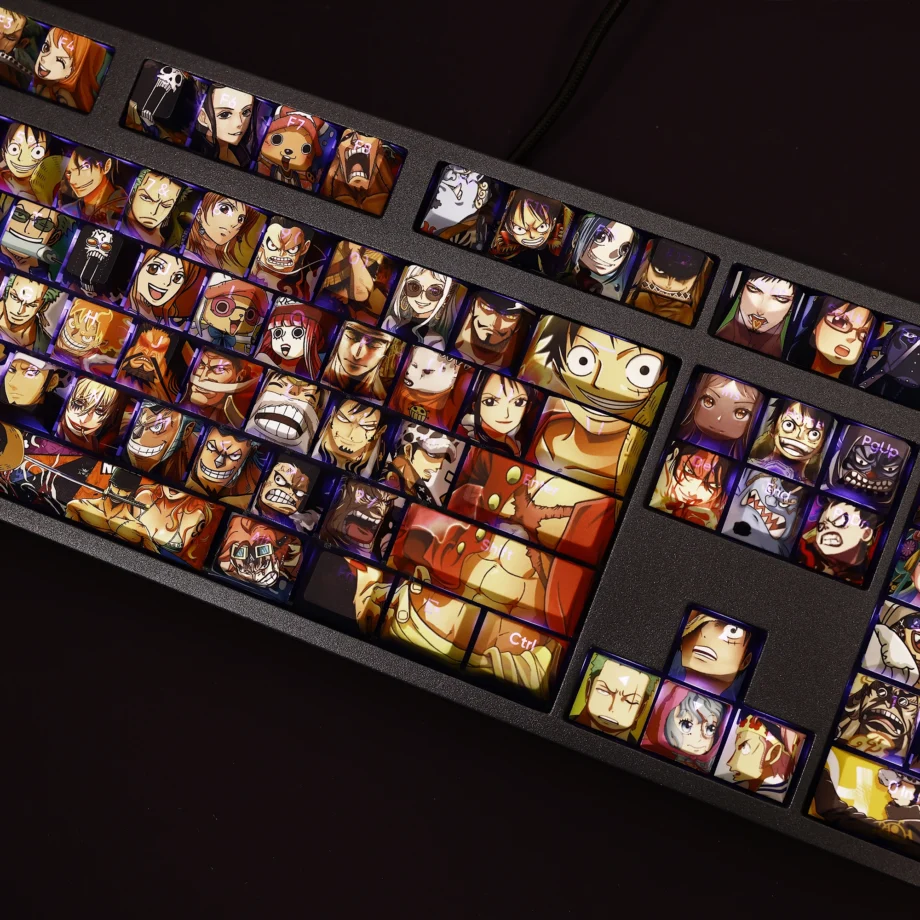
Want the whole Straw Hat Crew? Characters of One Piece Keycaps Set features multiple crew members across your keyboard.
Want sleek gaming aesthetic with One Piece energy? Backlit One Piece Keycaps offer black base with RGB shine-through for atmospheric typing.
Each style serves different priorities: obvious fandom display, comprehensive crew representation, or subtle One Piece theming that works for competitive gaming. Your choice depends on whether you want everyone to know you’re a One Piece fan or prefer that pirate energy to be your personal motivation.
Understanding One Piece Keycap Styles
Unlike franchises with colour-coded characters (like Pokémon starters), One Piece keycaps work differently. The strength isn’t in representing specific characters through colour schemes, it’s in capturing iconic imagery: wanted posters, character artwork, and that overall pirate adventure aesthetic.
This means One Piece keycaps come in distinct style categories rather than character-specific colour schemes.
Style 1: Wanted Poster Aesthetic
The Wanted Posters keycap set features Luffy’s bounty poster design, that iconic “WANTED: DEAD OR ALIVE” imagery that every One Piece fan recognises instantly. This is One Piece distilled to its most recognisable visual element.

Why this works: Wanted posters are synonymous with One Piece. Even people who don’t watch the show recognise that aesthetic. Having Luffy’s bounty on your keyboard signals “I’m a One Piece fan” without needing to explain which character you prefer.
What you get: The design typically features Luffy’s wanted poster imagery across the keycaps, with careful placement so the design reads clearly across your keyboard layout. It’s bold, immediately recognisable, and very distinctly One Piece.
Best for:
- Die-hard Luffy fans
- People who want instantly recognisable One Piece theming
- Setups where you want obvious fandom display
- Fans who connect with the “wanted by the World Government” rebellious energy
Aesthetic energy: Bold, rebellious, unmistakably One Piece. This is the “I’m proud to be a One Piece fan” option.
Style 2: Straw Hat Crew Character Art
The Characters of One Piece set features multiple Straw Hat Crew members across different keycaps. This gives you Luffy, Zoro, Nami, Sanji, and other crew members watching over your typing sessions.
Why this works: One Piece is fundamentally about the crew, not just Luffy. Having the entire Straw Hats represented feels more complete than solo character focus. Every time you look at your keyboard, you see the whole family.
What you get: Character artwork across multiple keycaps, typically with each crew member getting dedicated space. The distribution ensures you see your favourites regularly, whether that’s Zoro’s determination, Nami’s cleverness, or Sanji’s passion.
Best for:
- Fans who love the whole crew (not just Luffy)
- People who want variety across their keyboard
- Setups where detailed character art is appreciated
- Those who connect with the “nakama” (crewmate) theme
Aesthetic energy: Comprehensive, crew-focused, celebrating the journey together. This is the “the Straw Hats are family” option.
Style 3: Backlit Gaming Black
The Backlit One Piece keycaps use a black base with RGB shine-through capabilities, featuring One Piece designs that glow when backlit. This is One Piece energy channelled into gaming-focused aesthetics.

Why this works: Black keycaps with RGB create atmospheric gaming setups. The One Piece theming is there when you want it (backlit glow reveals the designs), but the black base keeps everything focused during competitive play.
What you get: Black PBT keycaps with translucent legends for RGB shine-through. The One Piece designs become visible when your RGB lighting is active, creating that dramatic effect where your keyboard literally glows with pirate energy.
Best for:
- Competitive gamers who want One Piece inspiration without distraction
- RGB keyboard owners who want to showcase their backlighting
- Night gaming sessions (the glow effect is genuinely atmospheric)
- People who prefer subtle fandom display
Aesthetic energy: Sleek, focused, atmospheric. This is the “One Piece powers my gaming” option.
How to Choose Your One Piece Keycaps
Choosing between One Piece keycap styles comes down to four key considerations that go beyond just “I like One Piece.”
Factor 1: Fandom Display Level
How obviously do you want your One Piece fandom displayed?
Maximum display: Wanted Posters set. Everyone who sees your keyboard knows you’re a One Piece fan. The bounty poster design is iconic and immediately recognisable.
Crew pride: Characters set. One Piece fans will recognise the Straw Hats immediately. Non-fans will see “anime keyboard with characters” without necessarily knowing the franchise.
Subtle energy: Backlit gaming set. Black keycaps read as “gaming keyboard” until your RGB lights up and reveals One Piece designs. It’s there for you without announcing itself to everyone.
If your keyboard is visible in work calls, consider whether you want “obvious anime fan” or “professional with personality.”
Factor 2: Character Preferences
Do you want Luffy-focused or crew representation?
Luffy loyalists: The Wanted Posters set centres on Luffy’s iconic imagery. If your connection to One Piece starts and ends with the captain, this delivers.
Nakama appreciation: The Characters set gives you the whole crew. If you love the dynamic between Zoro and Sanji, if Nami’s navigation skills inspire you, if Chopper makes you smile, you want crew representation.
Universal pirate energy: The backlit gaming set channels One Piece’s spirit without requiring specific character allegiance. It’s about the adventure itself.
Factor 3: Your Keyboard’s RGB
Do you have RGB backlighting, and do you actually use it?
RGB keyboard, lights always on: Backlit set creates dramatic glow effects. The One Piece designs literally illuminate.
RGB keyboard, lights sometimes off: Either backlit or character art sets work. Backlit looks good both lit and unlit. Character art is always visible regardless of lighting.
No RGB or lights always off: Wanted Posters or Characters sets. Backlit keycaps still function perfectly without RGB, but you lose the signature glow effect.
Factor 4: Gaming vs Productivity Focus
What do you primarily use your keyboard for?
Competitive gaming: Backlit black set reduces visual distraction while maintaining One Piece inspiration. Black keycaps with focused designs keep you in the zone.
Casual gaming and general use: Any set works perfectly. Choose based on aesthetic preference rather than performance considerations.
Productivity and creative work: Wanted Posters or Characters sets add personality to work sessions. Having the Straw Hats watching over your work genuinely makes long projects more enjoyable.
Mixed use: If you game competitively sometimes but use your keyboard for everything else, consider whether you want your keycaps to optimise for focus (backlit black) or inspiration (wanted posters, characters).
What Makes Quality One Piece Keycaps
The One Piece keycaps market in 2026 includes everything from cheap prints that fade within months to quality PBT sets that last years. Here’s what separates lasting keycaps from disposable ones.
PBT Material Standard
Quality One Piece keycaps use PBT (polybutylene terephthalate) plastic rather than ABS (acrylonitrile butadiene styrene). This isn’t just technical specs for the sake of it, the difference is genuinely noticeable in daily use.
PBT resists the oily shine that develops on ABS keycaps after months of use. Your wanted poster designs stay crisp, your character artwork remains vibrant, and your black gaming keycaps maintain that matte finish.
After a year of daily use, ABS keycaps develop shiny patches where your fingers rest most frequently. PBT keycaps still look practically new. For One Piece keycaps that you’ll use for years (because you’re not abandoning the Straw Hats’ journey), PBT is non-negotiable.
Dye-Sublimation Printing
The printing method determines whether your One Piece designs fade or last. Dye-sublimation permanently bonds the ink into the plastic. Cheaper printing methods apply designs on top of the plastic, like stickers.
What this means practically:
- Luffy’s wanted poster won’t fade after six months
- Straw Hat character artwork stays crisp indefinitely
- You can wash your keycaps without damaging designs
- The keycaps will outlast your switches (which is saying something)
Cheap One Piece keycaps with sticker-style printing might last 6-12 months before the designs start wearing off your most-used keys. That’s frustrating when you’re emotionally invested in having the Straw Hats with you daily.
Cherry MX Compatibility
All quality One Piece keycaps use Cherry MX-compatible stems, which is the industry standard. This means they fit the vast majority of mechanical keyboards: Cherry switches, Gateron, Kailh, Outemu, and dozens of other brands.
You don’t need a special keyboard for One Piece keycaps. If you have a mechanical keyboard purchased in the last five years, you’re almost certainly compatible.
Complete Sets for All Layouts
Quality sets include enough keycaps for full-size keyboards, tenkeyless (TKL), 65%, and 60% layouts. You’re not stuck hunting for additional modifier keys or discovering your spacebar doesn’t fit.
All the One Piece keycap sets in Keysium’s One Piece collection include complete coverage for standard ANSI layouts, so you can actually use them regardless of your keyboard size.
Building Your Pirate King Setup
If you’re new to mechanical keyboards and wondering how to turn One Piece keycaps into a complete setup, here’s the practical path from browsing to typing.
Step 1: Choose Your One Piece Style
Browse the One Piece keycaps collection and decide which style matches your priorities:
Wanted Posters if you want maximum Luffy representation
Characters if you want the whole Straw Hat Crew
Backlit Gaming if you want RGB-compatible One Piece energy
Don’t overthink this. Your gut reaction to seeing each set is probably correct.
Step 2: Match Your Keyboard Setup
If you already have a mechanical keyboard, you’re set. If you’re building from scratch, pair your One Piece keycaps with keyboard colours that complement the aesthetic:
For Wanted Posters: Black or dark grey cases create dramatic contrast with the wanted poster designs
For Characters set: White or neutral cases let the character artwork be the visual focus
For Backlit Gaming: Black cases obviously, leaning into that sleek gaming aesthetic
Step 3: Consider Switch Selection
If you’re building a keyboard or have a hot-swap board, choose switches based on your use case:
For gaming-focused builds: Linear switches (Red, Yellow, Black) provide smooth keystrokes without tactile bumps
For typing-focused builds: Tactile switches (Brown, Clear) give feedback without the loud click
For the full experience: Clicky switches (Blue, Green) are satisfying but loud (neighbours might form a World Government against you)
Your One Piece keycaps work with any switch type. The aesthetic and the typing feel are independent choices.
Step 4: RGB Lighting Strategy
If you have the backlit One Piece set, your RGB lighting strategy genuinely matters:
For atmospheric effect: Set RGB to warm orange/red (like Luffy’s fire techniques) or ocean blue (for the Grand Line)
For drama: Breathing or wave effects that pulse slowly
For focus: Solid colour that illuminates without distraction
If you have the wanted posters or characters sets without RGB, your keyboard backlighting (if any) creates underglow rather than shining through the keycaps. This can still look excellent with the right colour choices.
Step 5: Complete the Pirate Aesthetic
One Piece keycaps anchor your setup, but completing the theme takes it further:
Desk mat: Ocean themes, nautical patterns, or even official One Piece designs if you can find them
Cable: Coiled custom cables in ocean blue or red (Luffy’s vest colour)
Case colour: Match to your chosen One Piece keycap style
Monitor wallpaper: Thousand Sunny, Going Merry, or your favourite arc artwork
The goal isn’t to overwhelm with One Piece merchandise, but to create a cohesive setup where the keycaps are the centrepiece.
One Piece Keycaps FAQ
Are One Piece keycaps officially licensed?
These One Piece keycaps are inspired by the anime and manga but aren’t officially licensed by Toei Animation or Shueisha. The designs capture the spirit and imagery of One Piece while remaining distinct products.
This is standard in the mechanical keyboard community, where inspired designs for countless franchises exist. It allows for creative freedom, better pricing, and more variety than official licensing typically permits.
Do One Piece keycaps work with any mechanical keyboard?
If your keyboard has Cherry MX-style switches (which covers the vast majority of mechanical keyboards), these One Piece keycaps will fit. Cherry, Gateron, Kailh, Outemu, and dozens of other brands all use the same stem design.
The rare exceptions are Topre switches or proprietary laptop keyboards. If you bought a mechanical keyboard marketed as such in the last five years, you’re almost certainly compatible.
Which One Piece keycap set is best for gaming?
The backlit black One Piece set is specifically designed for gaming. The black base reduces visual distraction during competitive play, while the RGB shine-through creates atmosphere during casual sessions.
That said, keycaps don’t affect gaming performance. Your skill, switches, and keyboard features matter. If you prefer the wanted posters or character art aesthetic, use those for gaming without worry.
Can I use One Piece keycaps in a professional environment?
It depends on your workplace culture and how obviously you want to display fandom:
Conservative offices: The backlit black set is your best option. Black keycaps read as “gaming keyboard” rather than “anime fan,” and the One Piece designs only reveal with RGB lighting (which you can turn off during work calls).
Creative offices: Any One Piece set works. Creative fields generally accept personality in workspace design.
Remote work: Use whatever brings you joy. Your keyboard is for you.
Alternatively, have a professional keyboard for the office and save your One Piece setup for home.
How long do One Piece keycaps last with daily use?
Quality PBT One Piece keycaps with dye-sublimated printing last 5+ years of daily typing. The designs are part of the plastic itself, not a coating that can wear off.
You’ll likely want to change keycaps because you want a different aesthetic before these actually wear out. Luffy’s wanted poster will still be crisp, the Straw Hat character art will remain vibrant, and the black gaming keycaps will maintain their finish.
Cheap One Piece keycaps with sticker-style printing might last 6-12 months before fading becomes noticeable.
Can I mix One Piece keycaps with other sets?
Technically yes, but One Piece keycaps work best as complete sets rather than mixed with other franchises. The designs are meant to flow across your keyboard as a cohesive whole.
If you want multiple anime on your desk, consider building separate keyboards for different franchises. The mechanical keyboard community fully supports owning multiple boards.
Do backlit One Piece keycaps work without RGB?
Yes, perfectly. The backlit keycaps function identically to non-backlit versions when RGB is turned off. You lose the glow effect that reveals designs, but the keycaps themselves remain fully functional and look good unlit.
The advantage of backlit keycaps is flexibility. You can use RGB for dramatic effect during casual use, then turn it off for focused work or competitive gaming.
Popular One Piece Keyboard Builds 2026
If you need build inspiration, here are the most common One Piece keyboard setups fans are creating in 2026.
The Luffy Loyalist Build
Aesthetic: Wanted poster front and centre, maximum captain energy
Keycaps: Wanted Posters One Piece set
Keyboard: Mid-range mechanical in black or dark grey
Switches: Tactile Browns (versatile for everything)
RGB: Warm orange/red glow (fire techniques energy)
Popular with: Luffy fans, people who love wanted poster aesthetic
Perfect for: Bold fandom display, casual gaming and general use
The Nakama Celebration Build
Aesthetic: Whole crew represented, celebrating the journey together
Keycaps: Characters of One Piece Keycaps Set
Keyboard: White or neutral case (lets character art shine)
Switches: Linear Reds (smooth like the Thousand Sunny sailing)
RGB: Ocean blue underglow
Popular with: Crew-focused fans, people who love all the Straw Hats
Perfect for: Celebrating nakama energy, creative work sessions
The Pirate Gamer Build
Aesthetic: Sleek black with RGB glow, competitive ready
Keycaps: Backlit One Piece Keycaps
Keyboard: Black case with full RGB
Switches: Linear switches for gaming (Yellow, Black, or Red)
RGB: Breathing effect in ocean blue or dramatic red
Popular with: Competitive gamers, night owls, RGB enthusiasts
Perfect for: Gaming sessions that channel pirate determination
The Grand Line Explorer Build
Aesthetic: Adventure-focused, journey over destination
Keycaps: Any One Piece set that resonates with your journey
Keyboard: Hot-swap board (allows experimentation, like exploring new islands)
Switches: Mix of switch types across zones (tactile for typing, linear for gaming)
Desk setup: Nautical theme with ocean blue desk mat
Popular with: People who connect with One Piece’s exploration themes
Perfect for: Creating a complete pirate aesthetic workspace
The Simple Pirate Build
Aesthetic: One Piece inspiration without overwhelming setup
Keycaps: Wanted Posters or Characters set (choose based on preference)
Keyboard: Budget to mid-range mechanical (Keychron, Royal Kludge)
Switches: Whatever feels good (try a switch tester first)
No elaborate RGB or themed accessories: Just One Piece keycaps on a solid keyboard
Popular with: Fans who want One Piece energy without building elaborate setups
Perfect for: Budget-conscious builds, first mechanical keyboards
Why One Piece Keycaps Work
One Piece keycaps do something specific that’s worth understanding before you buy. They don’t just display fandom (though they do that), they bring that adventure energy to your daily work.
Every time you sit down to type, the Straw Hats are there. Luffy’s wanted poster reminds you to pursue your dreams with determination. The crew’s faces remind you that nakama matters. The pirate aesthetic reminds you that life is an adventure, not a grind.
This isn’t empty marketing. People who use One Piece keycaps report genuinely feeling more motivated during work sessions. The keycaps become this small but constant reminder of the values One Piece represents: freedom, friendship, pursuing dreams despite obstacles.
Compare this to generic productivity tools that claim to motivate you. One Piece keycaps motivate because they represent something you already care about deeply. The show’s themes resonate emotionally, and having that present on your keyboard creates this subtle but persistent positive association with the work you’re doing.
That’s the real value. Not just “cool anime keycaps,” but a daily reminder of the journey you’re on.
Your Journey to the Pirate King’s Keyboard
You now know which One Piece keycap style matches your setup, priorities, and fandom level. Whether you’re choosing the bold wanted poster aesthetic, celebrating the whole Straw Hat Crew, or channelling pirate energy through sleek black gaming keycaps, you’re getting quality PBT sets that bring One Piece into your daily life.
The best One Piece keycaps aren’t just about displaying fandom. They’re about having the Straw Hats’ journey present during your own journey. Every project you tackle, every game you play, every message you type has that pirate spirit behind it.
Browse the complete One Piece keycaps collection to compare all options, or jump straight to the style that spoke to you while reading this guide.
If you’re still figuring out how anime keycaps work generally, our complete anime keyboard guide covers materials, compatibility, and building your first custom keyboard across all franchises.
For keycap fundamentals beyond anime, our beginner’s guide to keycap essentials explains profiles, materials, and everything technical worth knowing.
Your Pirate King keyboard is waiting. Time to set sail on your Grand Line of productivity and gaming, with the Straw Hats watching over every keystroke.
The adventure starts when you choose your crew. Which One Piece keycap set calls to you?