FREE Shipping $50+
Searching for a “Harry Potter keyboard” and getting confused by all the results? You’re definitely not alone. Every month, thousands of Harry Potter fans search for keyboards, but here’s the thing most people don’t realize: what you’re probably looking for are Harry Potter keycaps, not an entirely new keyboard.
Before you spend $200+ on a pre-built “themed” keyboard that might disappoint you, let’s clear up exactly what you need, why keycaps are almost always the better choice, and how to transform your current setup (or build a new one) into a proper piece of Hogwarts history.
Wait, What’s the Difference Between a Keyboard and Keycaps?
If you’re new to the mechanical keyboard world, this distinction might not be obvious. Let’s break it down in plain English.
Your keyboard is the entire device: the case, the circuit board (PCB), the switches underneath each key, the stabilizers, the cable, and yes, the keycaps on top. It’s the complete package that sits on your desk.
Keycaps are just the plastic (or occasionally metal) caps that sit on top of each switch. They’re the part your fingers actually touch when you type. Think of them like phone cases: you don’t need a new phone to change how it looks, you just swap the case. Same principle here.
Here’s the crucial part: keycaps are completely removable and replaceable on mechanical keyboards. You can pull them off and put new ones on in about 15-20 minutes. No soldering, no technical knowledge required, just pull off the old ones and press on the new ones.
But What Even Is a Mechanical Keyboard?
Good question. If you’re using a standard laptop keyboard or a basic office keyboard, you’re probably using a membrane keyboard. When you press a key, you’re pushing down a rubber dome that completes an electrical circuit underneath.
Mechanical keyboards work differently. Each key has its own individual mechanical switch underneath it. When you press a key, you’re activating a spring-loaded switch mechanism. This gives you:
- Better tactile feedback: You can actually feel when a keypress registers, which improves typing accuracy
- Longer lifespan: Mechanical switches are rated for 50-100 million keypresses vs 5-10 million for membrane keyboards
- Customization options: You can swap keycaps, change switches, modify the sound and feel
- More satisfying typing experience: There’s a reason keyboard enthusiasts rave about mechanicals
And here’s why this matters for your Harry Potter setup: only mechanical keyboards let you easily swap keycaps. Membrane keyboards have keycaps that are much harder (sometimes impossible) to replace. So if you want to customize your keyboard with Harry Potter themes, you’ll need a mechanical keyboard.
Why Keycaps Are Almost Always the Smarter Choice Than Buying a “Themed” Keyboard
Now that you understand the basics, let’s talk about why buying Harry Potter keycaps separately is usually way better than buying a pre-built “Harry Potter keyboard” (if you can even find one).
1. You Keep Your Keyboard (or Choose a Better One)
Already have a mechanical keyboard you love? Perfect. Keep it. The switches feel great, you know where all the keys are, muscle memory is built in. Why replace something that works perfectly just to change how it looks?
Don’t have a mechanical keyboard yet? Even better. You get to choose exactly which keyboard you want based on:
- Switch type: Tactile, linear, or clicky? Heavy or light? You decide.
- Keyboard size: Full-size (with numpad), TKL (no numpad), 75%, 65%, 60%? Pick what fits your desk.
- Build quality: Aluminum case or plastic? Hot-swappable switches? Wireless or wired?
- Your actual budget: Spend $60 or $600, it’s up to you.
Pre-built themed keyboards lock you into whatever switches and build quality that manufacturer chose, and they’re usually cutting corners to keep prices competitive while adding the “theme tax.”
2. The Price Difference Is Massive
Let’s do the math:
- Pre-built “Harry Potter keyboard” (if you find one): $150-300+
- Quality mechanical keyboard + Harry Potter keycaps separately: $80-120 for keyboard + $50-80 for keycaps = $130-200 total
You’re getting a better keyboard AND the exact aesthetic you want for the same price or less. Plus, when you want to change themes later (maybe you’re feeling Slytherin this month but Ravenclaw next month), you only replace the $60 keycaps, not a $200 keyboard.
3. Infinite Customization Possibilities
Want Gryffindor keycaps for the summer? No problem. Switch to Slytherin for autumn? Easy. Mix and match different sets? Absolutely.
Swapping keycaps takes 15-20 minutes max. You literally just pull them off (using a keycap puller or carefully by hand) and press new ones on. No tools required beyond the puller, which usually comes with keycap sets anyway.
Try doing that with a whole keyboard. You can’t. You’re stuck with whatever theme you bought until you shell out for an entirely new keyboard.
4. Better Quality Control and Options
When you buy keycaps from a specialized retailer (like, ahem, one that focuses specifically on themed keycaps), you’re getting products designed specifically for aesthetics, durability, and proper manufacturing standards.
Pre-built themed keyboards? They’re usually made by general electronics manufacturers who slap a theme on a mediocre keyboard and charge a premium. The keycaps might be thin, the legends (letters/symbols) might fade quickly, the colors might not be quite right.
When you buy dedicated keycap sets, you’re getting:
- Thicker PBT plastic that won’t shine or fade
- Proper dye-sublimation or doubleshot legends that last forever
- Accurate colors that actually match the theme
- Coverage for different keyboard sizes and layouts

The Complete Guide to Harry Potter Keycaps (By House and Theme)
Alright, you’re convinced that keycaps are the way to go. Now let’s talk about which Harry Potter theme actually matches your personality, your setup, and your aesthetic goals.
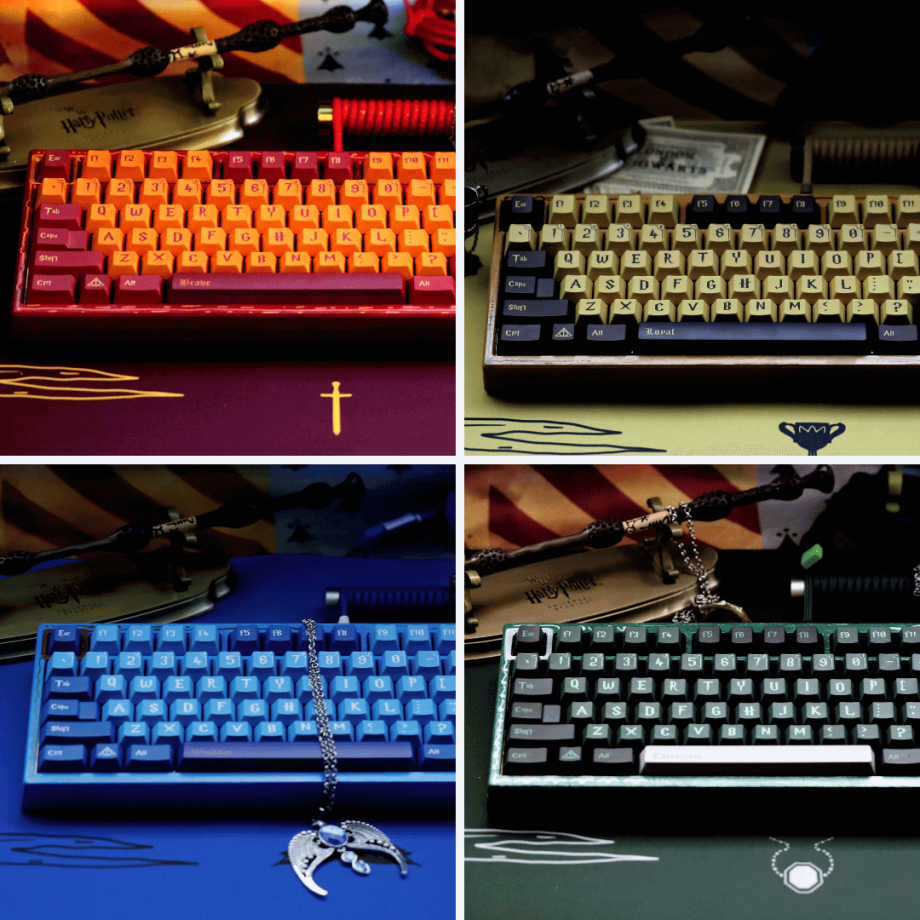
Gryffindor: Bold, Confident, Impossible to Ignore
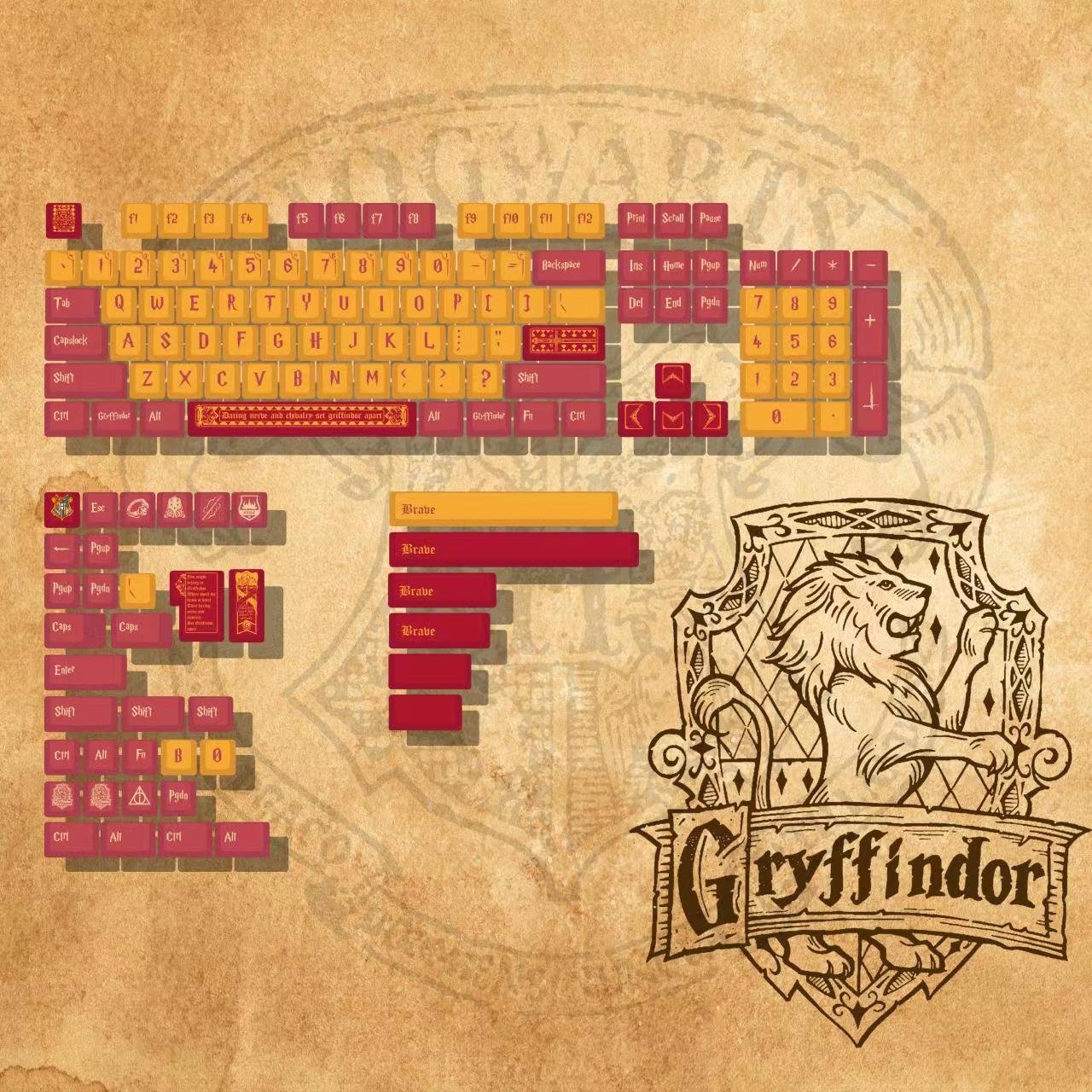
Let’s be real: Gryffindor keycaps are for people who want their setup to make a statement. That iconic scarlet and gold combination doesn’t whisper, it shouts. If you want a keyboard that radiates courage, confidence, and “yeah, I’m a Gryffindor and proud of it,” this is your set.
The Gryffindor Harry Potter Keycaps Set features that bold red and gold colorway that’s instantly recognizable. The contrast is striking, the colors pop against any desk setup, and honestly? It’s probably the most popular house choice for a reason.
Best for: Gaming setups with RGB lighting (the red looks incredible with backlighting), bold desk aesthetics, anyone who wants their keyboard to be a conversation starter.
Slytherin: Sophisticated, Mysterious, Elegantly Dark
If Gryffindor is a shout, Slytherin is a whisper. That deep emerald green and silver combination creates an aesthetic that’s sophisticated, mysterious, and just a little bit dangerous (in the best way).
The Slytherin Harry Potter Keycaps Set nails that ambitious, cunning vibe without being over-the-top. The green is rich without being neon, the grey/silver provides elegant contrast, and the overall effect is surprisingly professional. You could absolutely use these in an office and get compliments rather than weird looks.
Best for: Minimalist setups, professional environments where you want subtle personality, dark aesthetic desk themes, anyone who appreciates understated elegance.

Ravenclaw: Clean, Intelligent, Perfectly Balanced
Blue and white might sound basic until you see it done right. Ravenclaw keycaps create a clean, intelligent aesthetic that works with almost any setup. The cool blue tones are calming, the white provides crisp contrast, and the overall effect screams “I take my workspace seriously.”
The Ravenclaw Harry Potter Keycaps Set captures that scholarly vibe perfectly. The blue isn’t too dark or too bright, the white keeps everything feeling fresh and clean, and it photographs incredibly well if you’re into sharing your setup on social media.
Best for: Clean desk aesthetics, study/productivity setups, anyone who wants Harry Potter vibes without overwhelming colors, blue-themed builds.

Hufflepuff: Warm, Welcoming, Seriously Underrated
Here’s a hot take: Hufflepuff might be the most slept-on keycap choice, but it creates one of the most unique-looking keyboards. That warm brown and yellow combination gives off serious cozy, autumn, “I’m loyal and proud of it” vibes.
The Hufflepuff Harry Potter Keycaps work beautifully in setups that prioritize warmth and personality over aggressive gaming aesthetics. The brown is earthy without being boring, the yellow pops without being harsh, and together they create a keyboard that feels inviting and different from the usual black/white/RGB setups everyone else has.
Best for: Warm desk aesthetics, autumn/earthy themes, anyone tired of the usual keyboard colors, standing out from the Gryffindor/Slytherin crowd.

Beyond Houses: Alternative Harry Potter Themes
Not feeling the house pride? Or maybe you want something a bit darker, more mysterious, or more symbolic? There are other options.
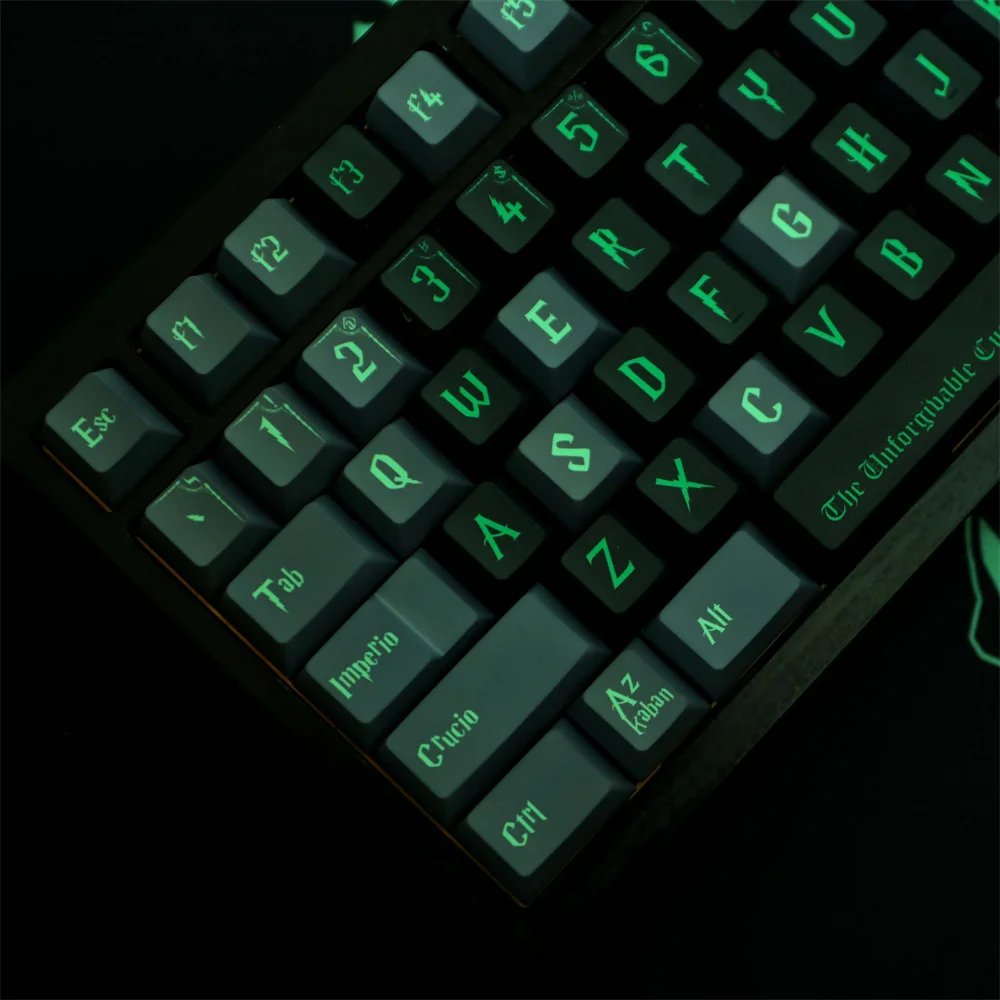
Death Eater Keycaps: For fans who appreciate the darker side of the wizarding world, the Death Eater Harry Potter Keycaps Set brings that ominous, villainous energy with deep green and black colorways. It’s perfect for fans who want Harry Potter vibes without the “good guy” house associations.
Phoenix Keycaps: Want something more subtle and symbolic? The Phoenix Harry Potter Keycaps Set features that legendary creature with detailed designs that Harry Potter fans will recognize, but casual observers might just think looks cool. Great for environments where you want to show your fandom without being obvious.

How to Actually Install Harry Potter Keycaps (It’s Easier Than You Think)
If you’ve never swapped keycaps before, the process might seem intimidating. It’s not. Seriously, if you can put a phone case on your phone, you can install keycaps.
What You’ll Need
- A keycap puller: Usually included with keycap sets, or buy one for $5-10
- Your new keycaps: Obviously
- 15-20 minutes: That’s it
The Process (Step by Step)
Step 1: Remove Your Old Keycaps
Use the keycap puller (looks like a small wire tool) to grip each keycap from opposite sides and pull straight up. Don’t twist or pull at an angle, just straight up with even pressure. The keycaps will pop right off.
Pro tip: Start with the letter keys first, save the larger keys (spacebar, shift, enter) for last since they can be slightly trickier with their stabilizers.
Step 2: Identify Your New Keycaps
Most Harry Potter keycap sets come with labels or are organized by row. The rows are different heights (notice how your top row is taller than your bottom row?). Make sure you’re putting the right profile keys in the right rows.
Usually the set includes extra keys for different layouts, so you’ll have options. Use the ones that match your keyboard size.
Step 3: Install the New Keycaps
Line up the keycap stem (the cross-shaped part underneath) with the switch stem (the cross-shaped part sticking up from your keyboard). Press down firmly but evenly until you hear/feel a click. That’s it. The keycap is installed.
Do this for every key. Start with the letter keys, then numbers, then function keys, then the larger keys with stabilizers.
Step 4: Test Everything
Open a text editor and type every key to make sure they all work properly and are seated correctly. If any key feels wobbly or doesn’t register, pull it off and reseat it.
That’s literally it. 15-20 minutes and your keyboard is completely transformed.
What If You Don’t Have a Mechanical Keyboard Yet?
No problem. This is actually the perfect time to get one, and you have two approaches:
Option 1: Buy a Budget Mechanical Keyboard First
Get a solid, no-frills mechanical keyboard ($60-100) and Harry Potter keycaps ($50-80) separately. Total investment: $110-180.
Good budget mechanical keyboards to consider:
- Keychron C-series (wired, solid build, multiple sizes)
- Royal Kludge RK-series (wireless option, good value)
- Redragon K-series (budget-friendly, gaming-focused)
These give you quality switches and build without breaking the bank. Then add your Harry Potter keycaps and you’ve got a setup that looks and feels amazing.
Option 2: Invest in a Higher-End Keyboard + Keycaps
If you want to really do this right and you’re committed to mechanical keyboards long-term, consider spending $150-250 on a premium keyboard body, then add your Harry Potter keycaps.
Premium options worth considering:
- Keychron Q-series (aluminum body, hot-swappable, incredible build quality)
- Mode keyboards (if you want the absolute best)
- Custom keyboard kits (for when you’re ready to dive deep)
Either way, buying keyboard + keycaps separately gives you way more control and usually better quality than any pre-built themed keyboard.
Common Questions About Harry Potter Keyboards and Keycaps
“Can I use these keycaps on my laptop?”
Unfortunately, no. Laptop keyboards use a completely different keycap attachment system (usually scissor switches or membrane) that isn’t compatible with mechanical keycaps. You need an actual mechanical keyboard to use custom keycaps.
“Will these work with my gaming keyboard?”
Probably! Most gaming keyboards use standard mechanical switches (usually Cherry MX or clones) that work with standard keycap sets. The only potential issue is keyboard layout. If you have a weird non-standard bottom row (looking at you, Corsair and Razer older models), some keys might not fit properly. Check your keyboard’s specifications or measure your spacebar, if it’s 6.25 units long, you’re good to go.
“Do these keycaps work with RGB backlighting?”
The keycaps themselves aren’t transparent, so if your keyboard has RGB backlighting, the light won’t shine through the legends (letters). However, light will still glow around the sides of the keycaps, creating a nice underglow effect. If you specifically want light-through legends, you’d need “shine-through” keycaps, which are different products.
“Can I buy just a few keys instead of a whole set?”
Generally, no. Keycap sets are sold as complete sets because matching colors across different production runs is nearly impossible. If you want Harry Potter themed keys, you’ll need to buy the full set.
“How long do these keycaps last?”
Quality PBT keycaps (like most Harry Potter sets) can last for decades. The legends won’t fade, the plastic won’t shine or yellow, and they won’t develop that gross oily texture cheap ABS keycaps get. Basically, they’ll outlast your keyboard.
The Bottom Line: Stop Searching for “Harry Potter Keyboards”
Here’s what you need to understand: when you search for a “Harry Potter keyboard,” what you’re really looking for is a way to bring your favourite wizarding world aesthetic to your desk setup.
The smartest, most cost-effective, highest-quality way to do that isn’t buying some pre-built themed keyboard that locks you into mediocre switches and limited options. It’s buying Harry Potter keycaps and putting them on a mechanical keyboard you actually want to type on every day.
You get:
- Better quality (both keyboard and keycaps)
- More customization (swap themes whenever you want)
- Lower total cost (or same cost for way better quality)
- The exact aesthetic you want (choose your house, choose your keyboard)
Whether you’re Team Gryffindor’s bold red and gold, Team Slytherin’s elegant green and silver, Team Ravenclaw’s clean blue and white, or Team Hufflepuff’s warm brown and yellow, there’s a keycap set that’ll transform your keyboard into a proper piece of Hogwarts history.
Browse the complete Harry Potter Keycaps collection and stop wasting time searching for mythical “Harry Potter keyboards” that probably don’t exist anyway. Get the keycaps, keep (or upgrade) your keyboard, and actually enjoy typing on a setup that represents your house pride properly.